The restaurant industry is experiencing its most profound operational shift since the invention of the cash register. QR ordering — once dismissed as a pandemic-era novelty — has evolved into a permanent infrastructure layer that separates thriving restaurants from struggling ones.
According to industry reports, digital menu adoption has crossed critical mass in major markets worldwide. In the Netherlands, 78% of restaurants now use digital menus. In the UK, that figure sits at 62%. In India, adoption has accelerated rapidly, driven by UPI penetration and smartphone ubiquity. The technology has definitively won the format debate against NFC and other alternatives because QR codes work on every smartphone, require zero hardware investment, and cost pennies to produce.
But here's what most restaurant owners miss: the restaurants winning with QR ordering are not the ones that simply stuck a QR code on the table. They're the ones that redesigned their entire service flow around digital dining. The ones failing? They're treating QR codes as a cost-cutting shortcut rather than a guest experience upgrade.
This guide is written for restaurant owners, café operators, chain managers, and hospitality investors who want to understand QR ordering at a depth no competitor article reaches. By the end, you'll know exactly how QR ordering works, what it costs, how to implement it, and — most importantly — how to choose a platform that turns every table into a revenue engine.
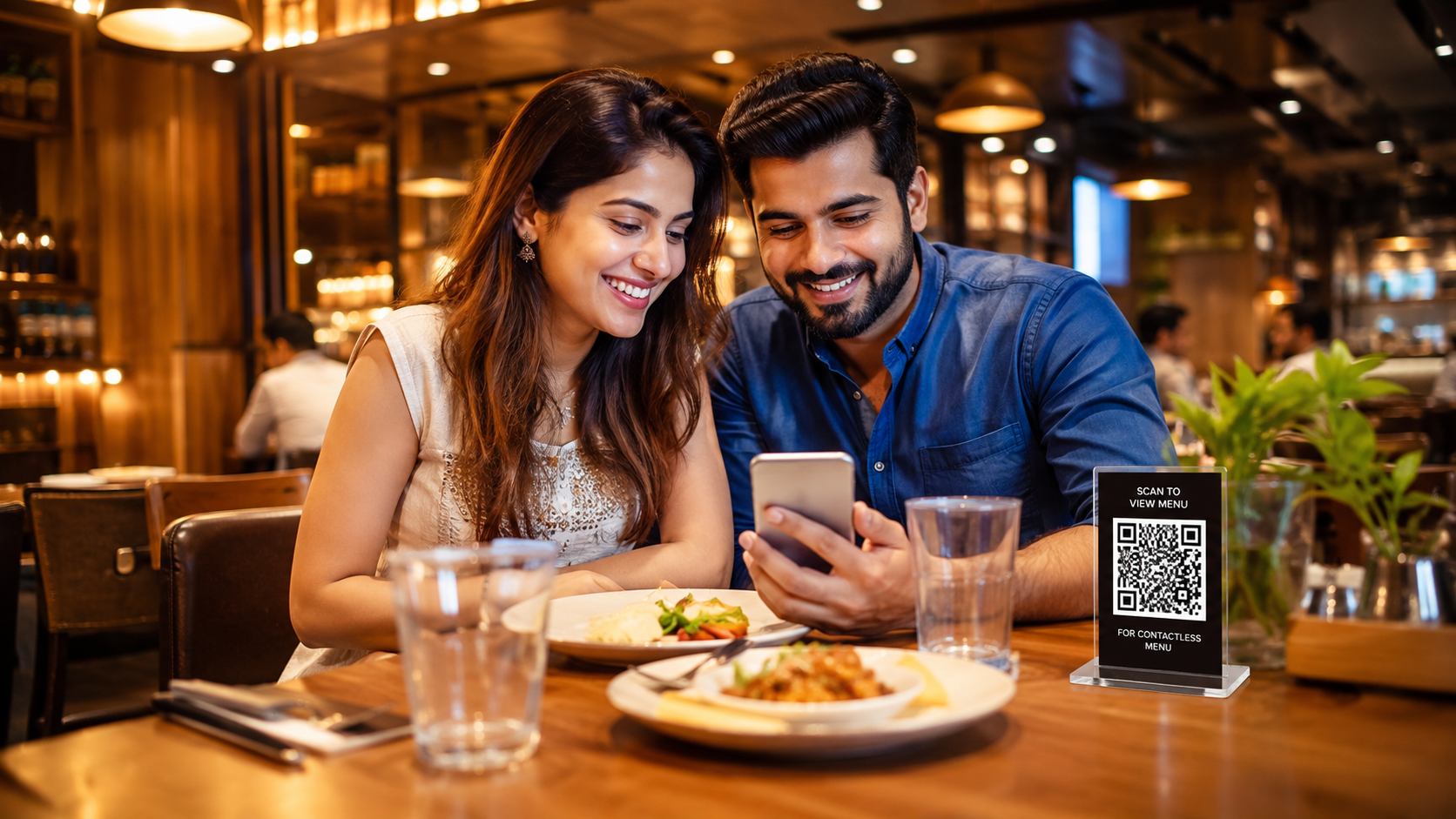
The Shift: Why the Best Restaurants Are Replacing Waiters with QR Codes (And Why the Worst Ones Are Failing at It)
The restaurant industry is experiencing its most profound operational shift since the invention of the cash register. QR ordering — once dismissed as a pandemic-era novelty — has evolved into a permanent infrastructure layer that separates thriving restaurants from struggling ones.
According to industry reports, digital menu adoption has crossed critical mass in major markets worldwide. In the Netherlands, 78% of restaurants now use digital menus. In the UK, that figure sits at 62%. In India, adoption has accelerated rapidly, driven by UPI penetration and smartphone ubiquity.
Key Insight
The QR code of 2026 is not the static PDF link of 2020. Modern QR ordering platforms offer AI-powered recommendations, multi-language auto-translation, dynamic pricing based on time of day, allergen detection, and nutritional information — all accessible through a browser.
What QR Ordering Actually Is — Beyond the Hype
QR ordering is a digital dining system where guests use their smartphones to scan a QR code placed at their table, browse an interactive digital menu, place orders, and often pay — all without downloading an app or creating an account.
But that's the surface definition. The deeper reality is this: QR ordering is a real-time communication layer between your guest, your kitchen, and your business intelligence system.
When a guest scans a QR code at Table 7, they are not just looking at a menu. They are triggering a chain of events:
- The menu loads with real-time availability (no sold-out items shown)
- Their selections flow directly to the kitchen display system
- Their order history builds a customer profile
- Their browsing behavior generates analytics
- Their payment completes the transaction loop
The Three Generations of QR Ordering
| Generation | Era | Characteristics | Typical Platform Cost |
|---|---|---|---|
| Gen 1: PDF Menus | 2020-2021 | Static PDF files, slow loading, no interactivity | Free or very low |
| Gen 2: Interactive Menus | 2022-2023 | Mobile-optimized, categories, photos, filters, search | $7-20/month |
| Gen 3: Integrated Ordering | 2024-Present | Full ordering, payment, POS integration, AI recommendations, analytics | $17-135/month |
Important
If you're evaluating QR ordering in 2026, anything below Gen 3 is leaving money on the table.
How QR Ordering Works: The Guest Journey from Scan to Satisfaction
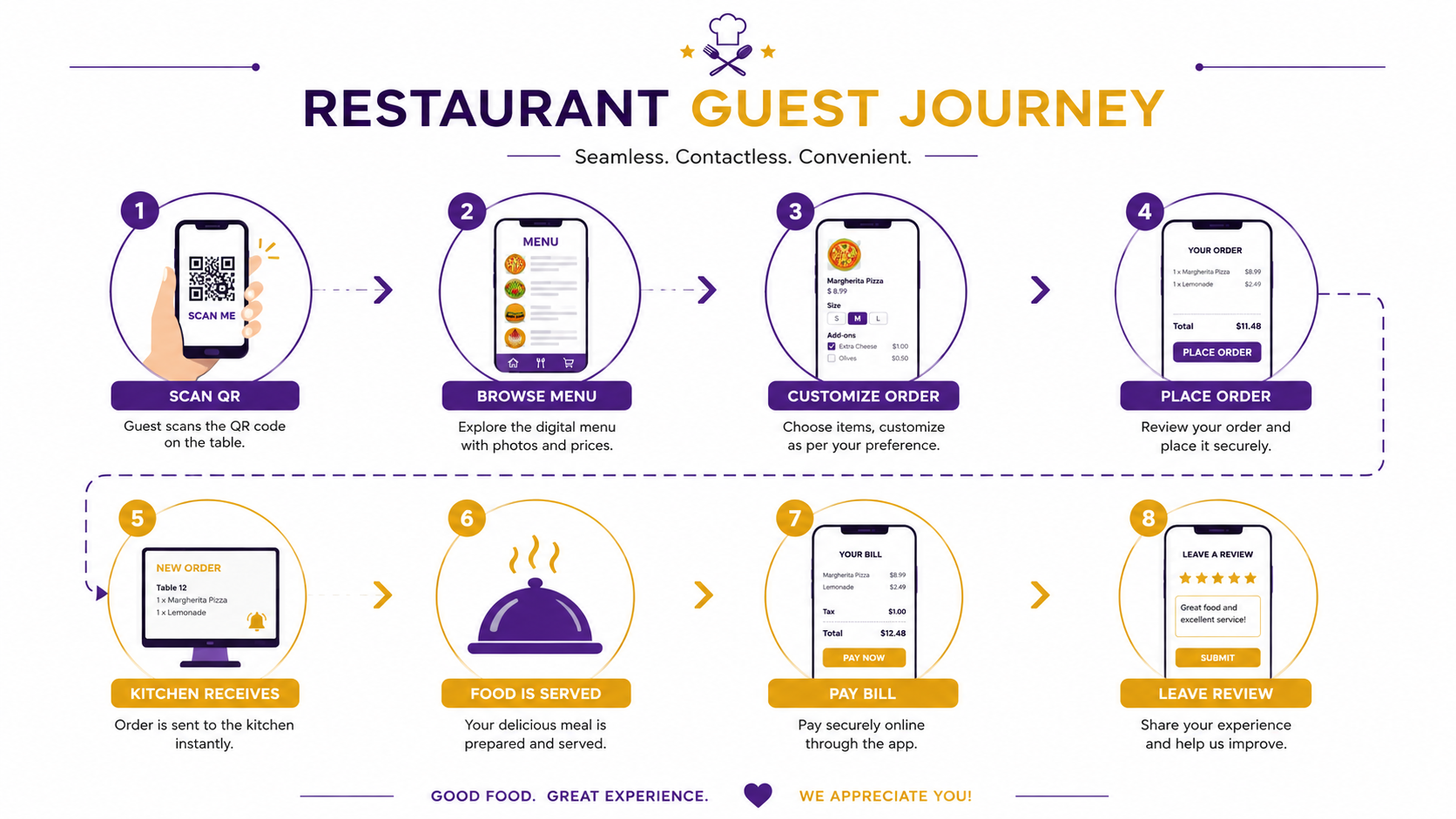
Understanding the guest journey is critical because every friction point is a potential lost order. Here's the complete flow:
Step 1: The Scan
A guest sits at their table and sees a QR code — typically on a table tent, sticker, or engraved stand. They open their phone camera, scan the code, and the menu loads instantly in their browser. No app download. No registration. No password.
Design Principle
The QR code should be scannable from a natural seated position. Place it at eye level when seated, not flat on the table where guests have to lean over awkwardly.
Step 2: The Browse
The digital menu loads with your restaurant's branding, categories, high-quality images, and descriptions. The guest can filter by dietary preferences (vegetarian, vegan, gluten-free, halal, kosher), sort by price, or search for specific items.
Step 3: The Customize
The guest taps an item and sees customization options — extra cheese, spice level, protein choice, side substitutions. Each modifier can have an upsell price attached.
Upsell Tip
Default to the premium option. If "Add Avocado (+$2)" is unchecked by default, most guests won't check it. If it's pre-checked with an option to remove, attach rates increase significantly.
Step 4: The Cart Review
The guest reviews their cart, sees the total with tax, and can add or remove items. This is where smart platforms show "Frequently Bought Together" suggestions or "Complete Your Meal" recommendations.
Step 5: The Order Placement
The guest places the order. In a full QR ordering system, this sends the order directly to the kitchen display system (KDS) with the table number.
Critical Distinction
View-only QR menus (Gen 2) reduce printing costs but don't solve the ordering bottleneck. Integrated QR ordering (Gen 3) eliminates the server as an intermediary for order taking, freeing them to focus on hospitality.
Step 6-9: Kitchen to Payment
The kitchen receives the order on a display screen with clear ticket formatting. A server delivers the food when ready. The guest can pay through the QR system (UPI, card, digital wallet) or request the bill from a server. Post-meal, the guest receives a feedback request or review prompt.
QR Menu vs. Traditional Menu: The Decision Framework
This is not an either/or decision for most restaurants. It's a "when to use what" decision.
| Factor | QR Menu | Traditional Menu | Winner |
|---|---|---|---|
| Update Speed | Instant — change prices in seconds | Requires reprinting; days to weeks | QR Menu |
| Cost Over Time | Low monthly fee; zero printing | Recurring printing costs | QR Menu |
| Guest Friction | Requires smartphone | Zero friction | Traditional |
| Upsell Capability | Built-in recommendations | Depends on server skill | QR Menu |
| Data & Analytics | Rich — views, clicks, conversion | None | QR Menu |
| Brand Experience | Clean, modern, tech-forward | Tactile, premium, traditional | Context-dependent |
| Accessibility | Text resizing, screen readers | Large print versions needed | QR Menu |
| WiFi Dependency | Requires internet | Works offline | Traditional |
| Battery/Device Issues | Guest phone dead = no menu | Always available | Traditional |
| Hygiene | Contactless; no shared surface | Shared surface; requires sanitizing | QR Menu |
The Hybrid Approach (Recommended)
Use QR menus as the primary system and keep a small batch of printed menus (10-20 per shift) for guests who prefer them. This captures 90%+ of orders through the efficient digital channel while protecting the experience for technology-resistant guests.
QR Ordering vs. Waiter Ordering: When to Use What
This is where many restaurant owners get confused. QR ordering does not replace waiters. It replaces the order-taking function of waiters, allowing them to focus on hospitality.
| Scenario | QR Ordering | Waiter Ordering |
|---|---|---|
| High-volume lunch rush | ✅ Ideal — reduces bottleneck | ❌ Slows down; queues form |
| Fine dining with wine pairings | ⚠️ Supplementary — menu browsing only | ✅ Primary — sommelier consultation |
| Bar with rotating taps | ✅ Ideal — instant menu updates | ❌ Staff can't memorize 20 beers |
| Family restaurant with modifiers | ✅ Ideal — visual customization | ⚠️ Risk of miscommunication |
| Elderly clientele (65+) | ⚠️ Offer as option | ✅ Primary — personal interaction |
| Tourist-heavy location | ✅ Ideal — auto-translate 10+ languages | ❌ Language barriers cause errors |
| Upsell-heavy concepts | ✅ Ideal — AI recommendations at scale | ⚠️ Depends on server skill |
When QR ordering handles order-taking, servers can manage more tables. A server who previously handled 4 tables can now effectively cover 6-8 tables because their time is spent on service, not data entry.
— Restaurant Operations Analysis, 2026QR Ordering vs. POS Ordering: The Integration Imperative
This comparison confuses many restaurant owners because QR ordering and POS ordering are not competitors — they are layers of the same system.
POS Ordering = The staff-facing system where orders are entered, payments are processed, and reports are generated.
QR Ordering = The guest-facing system where customers browse and place orders.
The critical question is not "QR or POS?" but "Does my QR system talk to my POS?"
| Integration Level | Description | Operational Impact |
|---|---|---|
| No Integration | QR orders print separately; staff manually re-enter into POS | Double work, errors, reporting gaps |
| Partial Integration | QR orders push to POS but require manual confirmation | Reduced errors but still creates bottlenecks |
| Full Integration | QR orders auto-sync to POS, inventory, and KDS in real-time | Zero re-entry, accurate reporting, live 86'ing |
The Hard Truth
A standalone QR ordering app that doesn't integrate with your POS is often worse than no QR ordering at all. It creates a parallel workflow that increases staff workload and introduces errors.
Standalone QR Systems vs. POS-Integrated QR Systems
| Factor | Standalone QR System | POS-Integrated QR System |
|---|---|---|
| Monthly Cost | $7-39/month | $59-135/month (or bundled) |
| Setup Time | 1-2 hours | 1-3 days |
| Hardware Required | Just QR code prints | QR prints + POS hardware |
| Inventory Sync | Manual or not available | Automatic; real-time |
| Sales Reporting | Separate dashboard | Unified with POS reports |
| Staff Training | Minimal | Moderate |
| Best For | Small cafés, food trucks, pop-ups | Full-service restaurants, chains |
| Risk | Data silos, double work | Higher cost, vendor lock-in |
Decision Tree
Cloud-Based vs. Local Systems: Why It Matters for Your Restaurant
| Factor | Cloud-Based QR System | Local/On-Premise System |
|---|---|---|
| Accessibility | Manage from anywhere with internet | Must be on-site or VPN |
| Updates | Automatic; no IT needed | Manual; requires technical staff |
| Scalability | Add locations in minutes | Requires hardware per location |
| Disaster Recovery | Automatic backups | Manual backup responsibility |
| Cost Structure | Monthly subscription | High upfront; lower ongoing |
| Internet Dependency | Requires stable connection | Works offline (mostly) |
| Multi-Location Management | Centralized control | Complex; requires sync solutions |
Verdict for 2026
Cloud-based systems have won. The only restaurants that should consider local systems are those with extremely unreliable internet (rural locations) or specific regulatory requirements mandating on-premise data storage.
Restaurant App vs. QR Ordering: The Download Problem
Some restaurant chains invest heavily in branded mobile apps. Here's why QR ordering almost always wins:
| Factor | Branded Restaurant App | QR Ordering |
|---|---|---|
| Guest Friction | Must download, install, register, log in | Scan and go — zero friction |
| Storage Space | Consumes phone memory | Zero storage used |
| Update Frequency | Guests must update manually | Always current |
| Cross-Platform | Must build iOS + Android | Works on every phone with browser |
| Push Notifications | ✅ Possible (if permissions granted) | ❌ Not possible (SMS/email available) |
| Loyalty Integration | ✅ Deep integration possible | ⚠️ Requires phone/email capture |
| Development Cost | $50,000-200,000+ | $0-135/month |
| Adoption Rate | 5-15% of customers download | 70-90% of seated guests scan |
The Exception
Large chains (100+ locations) with established loyalty programs may benefit from an app in addition to QR ordering. But QR should remain the primary entry point for new customers.
Paper Menu vs. Digital Menu: The Hidden Cost of Ink
Most restaurant owners underestimate the true cost of paper menus:
| Cost Category | Annual Estimate (50-seat restaurant) |
|---|---|
| Initial design | $500-2,000 |
| Printing (quarterly updates) | $800-1,500/year |
| Lamination/special finishes | $300-600/year |
| Emergency reprints (price changes, 86'd items) | $200-500/year |
| Storage and organization | $100-200/year |
| Total Annual Paper Menu Cost | $1,900-4,800/year |
A digital menu platform at $50/month costs $600/year — and includes unlimited updates, analytics, and ordering capabilities.
The Sustainability Angle
Digital menus eliminate paper waste, printing chemicals, and transportation emissions from print deliveries. For restaurants in eco-conscious markets (Northern Europe, Pacific Northwest, urban Australia), this is a genuine marketing advantage.
Benefits of QR Ordering: The 12 Operational Levers
1. Instant Menu Updates
Change a price at 2 PM. It's live at 2:00:01 PM. No reprints. No staff confusion. No guest complaints about outdated prices.
2. Real-Time 86'ing
When the kitchen runs out of salmon, mark it unavailable in the dashboard. Every guest scanning the QR code sees it instantly. No more "Sorry, we're out of that" conversations.
3. Multi-Language Support
A tourist from Japan scans your QR code. The menu auto-translates to Japanese. Your staff doesn't need to speak Japanese. According to industry reports, restaurants in tourist-heavy areas have seen specialty orders increase by up to 28% simply because guests could read descriptions in their native language.
4. Visual Upselling
High-quality photos increase order attachment rates. A picture of molten chocolate cake next to the "Add Dessert" prompt converts better than a verbal suggestion from a busy server.
5. Structured Modifiers
Guests build their perfect order through intuitive toggles: "Extra cheese? Spicy? Gluten-free bun?" Each modifier can carry an upsell price. No miscommunication. No "I said no onions" disputes.
6. Order Accuracy
What the guest taps is what the kitchen sees. No handwriting interpretation. No lost tickets. No "the server heard wrong" errors.
7. Faster Table Turnover
Guests don't wait for a server to take their order. They don't wait for the check. Scan-to-pay can save 10-15 minutes per table, allowing one additional seating per night per table.
8. Labor Reallocation
Servers spend less time taking orders and running payments. They spend more time on hospitality — refilling drinks, checking satisfaction, building rapport. According to industry reports, well-integrated QR systems can reduce front-of-house labor needs by approximately 30%.
9. Rich Analytics
See which items are viewed but not ordered (menu optimization). See peak ordering times (staffing decisions). See average order value by table (server performance). See which modifiers are most popular (inventory planning).
10. Dynamic Pricing
Run happy hour pricing that activates automatically at 4 PM. Charge weekend brunch premiums. Offer slow-period discounts on Tuesday afternoons. Physical menus can't do this.
11. Contactless Hygiene
No shared surfaces. No sanitizing menus between guests. In post-pandemic consciousness, this remains a genuine guest comfort factor.
12. Marketing Integration
Collect phone numbers or emails at checkout. Send post-visit review requests. Push promotions to repeat customers. Your menu becomes a marketing channel.
Disadvantages of QR Ordering: The Honest Truth
No honest guide would omit the challenges. Here are the real disadvantages:
1. Guest Resistance
Some guests — particularly those over 60 — actively dislike QR menus. They associate them with cost-cutting or feel uncomfortable using their phone during a meal.
Mitigation
Always offer a paper menu alternative.
2. Technology Dependence
Dead phone batteries, poor WiFi, and camera issues can block access.
Mitigation
Ensure robust WiFi and train staff to assist guests who struggle.
3. Loss of Human Connection
In fine dining, the ritual of a server presenting the menu, explaining specials, and recommending wine is part of the experience.
Mitigation
Use QR for browsing but maintain server involvement for recommendations and hospitality.
4. Upfront Learning Curve
Staff need training. Guests need guidance during the first few weeks.
Mitigation
Start with a soft launch — one section of the restaurant or one shift per day.
5. Platform Costs
While cheaper than paper over time, there is a monthly subscription cost. For restaurants with tight margins, this matters.
Mitigation
Start with a basic plan and upgrade as revenue increases.
6. Data Privacy Concerns
Guests may worry about their data being collected.
Mitigation
Be transparent. Use GDPR/CCPA-compliant platforms. Don't require personal information for ordering.
Which Restaurant Types Win the Most from QR Ordering
| Restaurant Type | QR Ordering Fit | Primary Benefit |
|---|---|---|
| Fast Food / QSR | ⭐⭐⭐⭐⭐ | Speed of service; high volume handling |
| Fast Casual | ⭐⭐⭐⭐⭐ | Customization-heavy menus; line reduction |
| Casual Dining | ⭐⭐⭐⭐☆ | Labor efficiency; upselling |
| Fine Dining | ⭐⭐⭐☆☆ | Menu browsing; wine lists; supplement to service |
| Bars & Pubs | ⭐⭐⭐⭐⭐ | Rotating taps; instant menu updates |
| Cafés | ⭐⭐⭐⭐⭐ | Morning rush handling; loyalty integration |
| Cloud Kitchens | ⭐⭐⭐⭐⭐ | Essential — no physical dining room |
| Food Trucks | ⭐⭐⭐⭐☆ | Low overhead; quick setup |
| Hotels (Room Service) | ⭐⭐⭐⭐⭐ | In-room ordering; multi-language |
| Multi-Location Chains | ⭐⭐⭐⭐⭐ | Centralized menu management; brand consistency |
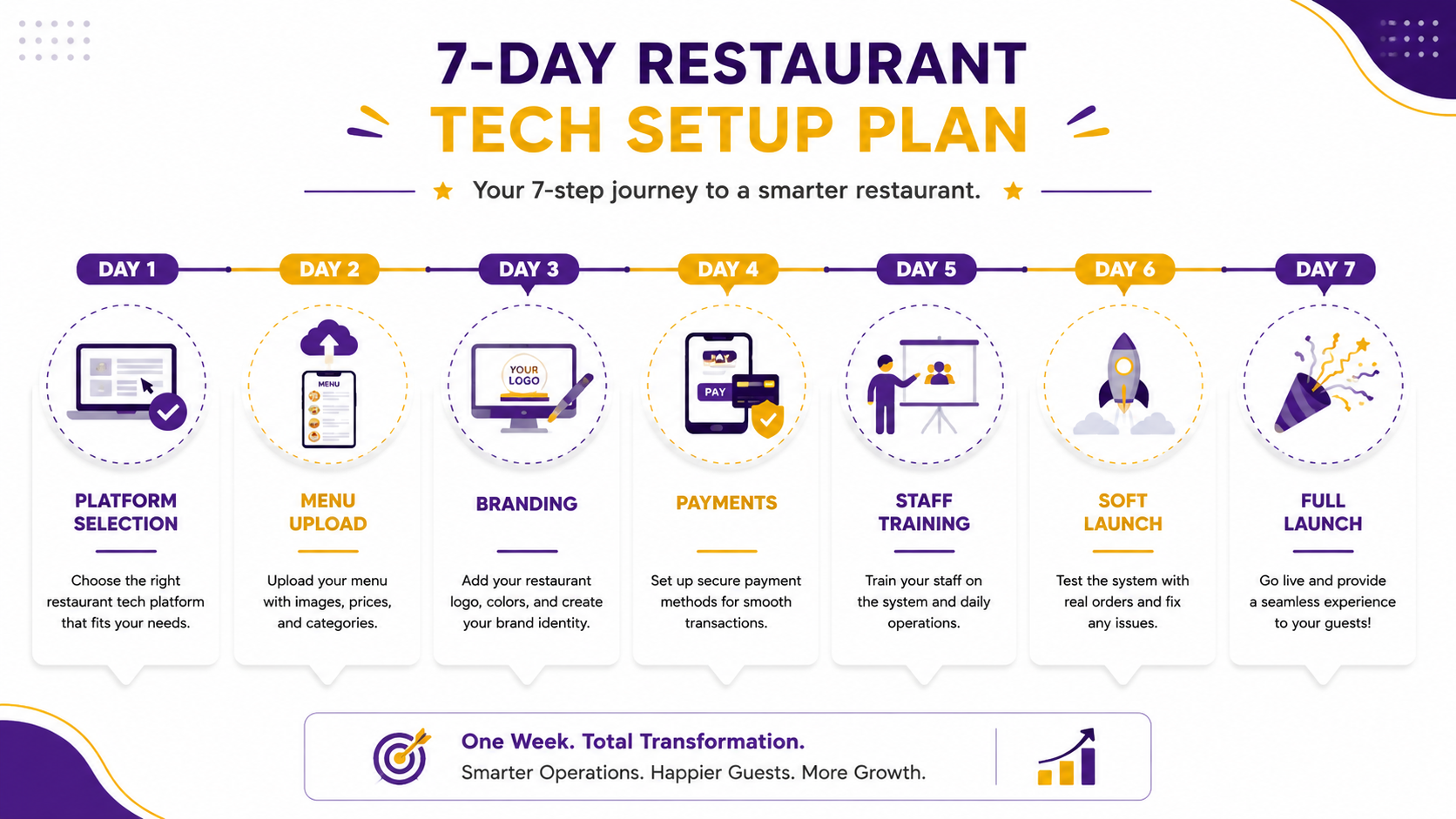
Implementation Roadmap: From Zero to Live in 7 Days
Day 1: Platform Selection
- Define your requirements: ordering-only, or ordering + payment + POS integration?
- Evaluate 3-5 platforms (including FluuexQR)
- Check for: multi-language support, payment options, KDS integration, analytics
- Sign up for free trials
Day 2: Menu Digitization
- Upload your menu items, descriptions, and prices
- Add high-quality photos (minimum 800x800px, well-lit)
- Create categories: Starters, Mains, Desserts, Beverages
- Set up modifiers and upsell options
- Add allergen information and dietary tags
Day 3: Branding & Design
- Upload your logo
- Set brand colors
- Customize the menu layout and typography
- Ensure mobile responsiveness (test on iPhone and Android)
- Add your restaurant's story or chef's note
Day 4: Payment & Integration Setup
- Connect payment gateways (Stripe, PayPal, UPI, etc.)
- Configure tax rates and service charges
- If integrating with POS, test the sync
- Set up kitchen display system (KDS) if applicable
Day 5: Staff Training
- Train servers on how to assist guests with QR ordering
- Explain the new workflow: "Your role shifts from order-taker to hospitality host"
- Practice handling common issues: dead batteries, WiFi problems, guest resistance
- Create a one-page cheat sheet for staff
Day 6: Soft Launch
- Launch QR ordering in one section or during one shift
- Place QR codes on 50% of tables; keep paper on the rest
- Monitor closely: are guests scanning? Are orders coming through correctly?
- Collect feedback from staff and guests
Day 7: Full Launch & Optimization
- Roll out to all tables
- Monitor analytics: scan rates, order completion rates, average order value
- Adjust menu layout based on what's being viewed vs. ordered
- Add table-specific QR codes if your platform supports it
Cost Analysis: What QR Ordering Really Costs (and Saves)
Monthly Platform Costs (2026 Market Rates)
| Platform Type | Monthly Cost | Best For |
|---|---|---|
| Basic QR Menu (view-only) | $0-7/month | Small cafés, pop-ups |
| QR Ordering (with cart & payment) | $17-39/month | Independent restaurants |
| QR + POS Integration | $59-135/month | Full-service restaurants |
| Enterprise/Multi-Location | Custom pricing | Chains, hotel groups |
One-Time Costs
| Item | Cost Range |
|---|---|
| QR code printing (table tents, stickers, stands) | $50-200 |
| Staff training time | $200-500 (opportunity cost) |
| Menu photography (if hiring professional) | $300-1,000 |
| POS integration setup (if applicable) | $0-500 |
Annual Savings vs. Paper Menus
| Expense | Paper Menu Annual Cost | Digital Menu Annual Cost | Savings |
|---|---|---|---|
| Printing & reprints | $1,500-3,000 | $0 | $1,500-3,000 |
| Design updates | $500-1,000 | $0 | $500-1,000 |
| Labor (order-taking time) | $3,000-8,000* | $1,000-2,500* | $2,000-5,500 |
| Total Annual Savings | $4,000-9,500 |
*Estimated based on server hourly wages and time spent on order-taking/payment processing
Net Annual Impact
Even at $100/month ($1,200/year) for a premium QR platform, the net savings typically range from $2,800-8,300 annually for a 50-seat restaurant.
ROI Calculation: The Numbers That Matter
The Three Revenue Levers of QR Ordering
1. Average Order Value (AOV) Increase
Digital menus with visual upsells and "Frequently Bought Together" recommendations typically increase AOV by 10-20%. For a restaurant with $20 average check and 200 orders/day:
- 15% AOV increase = $3 extra per order
- $3 × 200 orders × 365 days = $219,000 additional annual revenue
2. Table Turnover Improvement
Saving 10-15 minutes per table allows one additional seating per table per night. For a 30-table restaurant:
- 30 extra seatings × $25 average check = $750 additional daily revenue
- $750 × 365 days = $273,750 additional annual revenue
3. Labor Cost Reduction
Reducing front-of-house staff by one server per shift (through efficiency gains):
- $15/hour × 8 hours × 2 shifts × 365 days = $87,600 annual labor savings
Simple ROI Formula
Conservative Estimate
Even if you discount these numbers by 80% for conservatism, the ROI remains compelling.
Security & Data Privacy: What Restaurant Owners Must Know
Payment Security
- Ensure your QR platform is PCI DSS compliant
- Payment data should be tokenized (platform never stores raw card numbers)
- UPI payments should use official UPI intent flows
- Look for SSL encryption (HTTPS) on all menu pages
Guest Data Privacy
- Collect only necessary data (phone/email for receipts only if guest opts in)
- Ensure GDPR compliance if serving EU guests
- Ensure CCPA compliance if serving California guests
- Provide clear privacy policy link on menu
- Never sell guest data to third parties
Operational Security
- Staff should have role-based access (manager vs. server vs. kitchen)
- Menu changes should require approval workflows
- Audit logs should track who changed what and when
- Backup menu data regularly
Payment Integration: UPI, Cards, Cash, and Everything In Between
| Payment Method | QR Platform Support | Guest Experience | Best For |
|---|---|---|---|
| UPI (India) | ✅ Native integration | Scan QR → UPI app opens → enter PIN → done | India, Indian diaspora |
| Credit/Debit Cards | ✅ Via Stripe/PayPal | Enter card details or use saved card | USA, Canada, UK, Australia |
| Digital Wallets | ✅ Apple Pay, Google Pay | One-tap payment | Tech-savvy markets |
| Cash | ⚠️ Requires staff involvement | Guest selects "Pay Cash" → server collects | Traditional markets, older guests |
| Split Bill | ✅ Advanced platforms only | Each guest pays their share | Groups, corporate dining |
| Tip Integration | ✅ Most platforms | Pre-set tip percentages (15%, 18%, 20%) | USA, Canada |
Critical Implementation Note
In India, UPI is non-negotiable. In the US, card payments dominate. In the UAE, digital wallets and card payments are essential. Your QR platform must support the payment methods your market expects.
Kitchen Workflow: How QR Ordering Changes the Back of House
Traditional Workflow (Without QR Ordering)
- Server writes order on pad
- Server walks to POS terminal
- Server enters order into POS
- POS prints ticket to kitchen
- Kitchen staff reads ticket
- Kitchen prepares food
- Server delivers food
Time per order: 3-5 minutes of server time
QR Ordering Workflow (With Integration)
- Guest places order via QR menu
- Order auto-syncs to POS
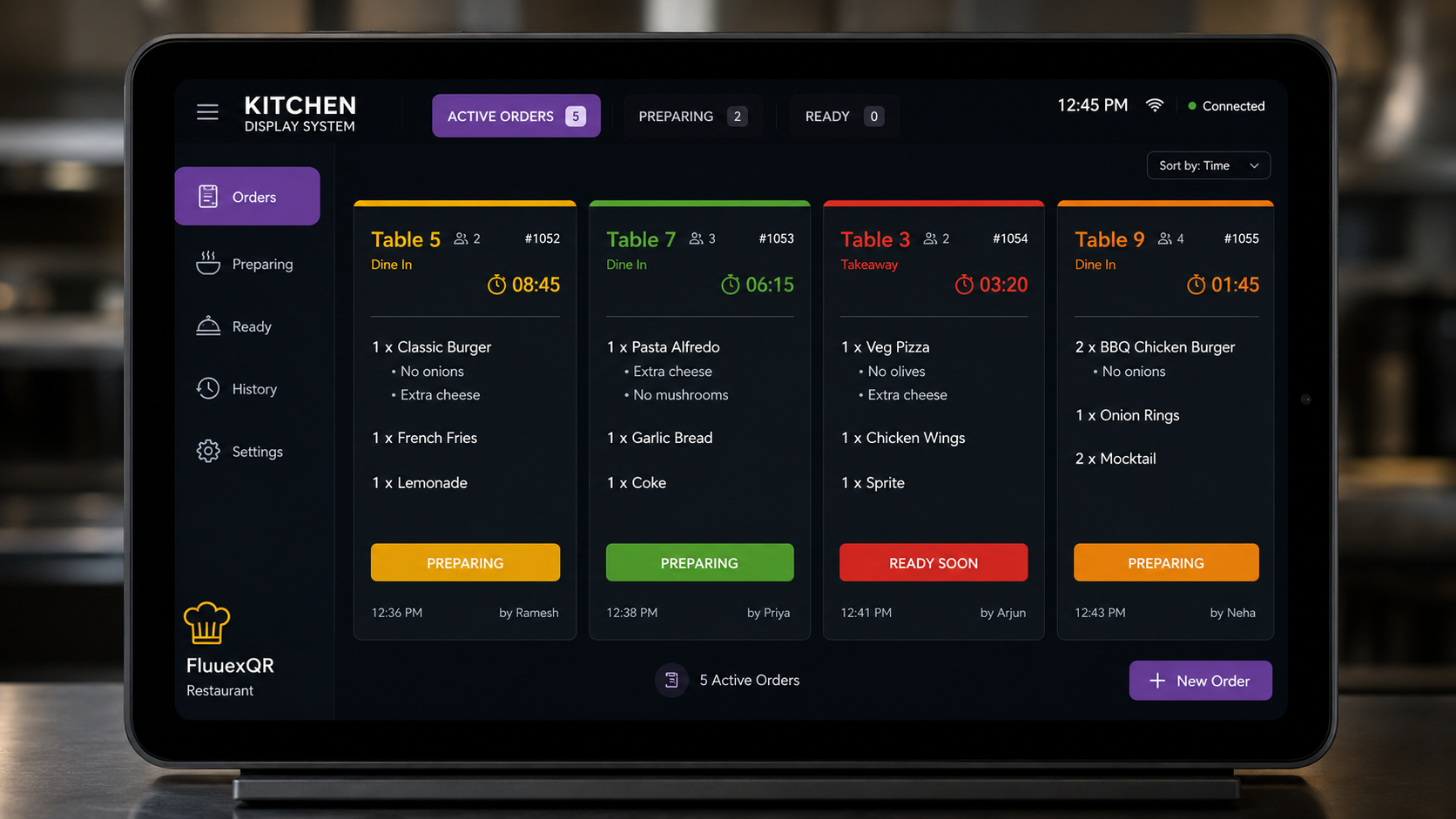
- Kitchen Display System (KDS) shows ticket instantly
- Kitchen prepares food
- Server delivers food
Server time per order: 0 minutes
Kitchen Display System (KDS) Benefits
| Feature | Impact |
|---|---|
| Real-time order display | No lost tickets; no handwriting confusion |
| Color-coded urgency | Items approaching time limits flash red |
| Course routing | Appetizers go to cold station; mains to hot station |
| Modifier clarity | "No onions" displayed prominently, not in tiny print |
| Bumping system | Kitchen marks items complete; servers see status |
| Analytics | Track prep times by dish; identify bottlenecks |
Customer Experience: Designing for Delight, Not Friction
The 5 Principles of QR Menu UX
1. Load in Under 3 Seconds
Every second of load time increases bounce rate. Optimize images. Use CDN delivery. Test on 3G connections.
2. Thumb-Friendly Navigation
Place primary actions (Add to Cart, View Cart) in the bottom third of the screen where thumbs naturally rest.
3. Visual Hierarchy
Use size, color, and spacing to guide attention. Your highest-margin items should be the most visually prominent.
4. Progressive Disclosure
Don't show everything at once. Show categories first. Expand to items. Expand to modifiers. One decision at a time.
5. Clear Feedback
When a guest adds an item, show a confirmation. When they place an order, show an order number. When payment succeeds, show a thank you. Never leave them wondering.
Common UX Mistakes
| Mistake | Why It Hurts | Fix |
|---|---|---|
| PDF menus | Slow, unscrollable, unsearchable | Use interactive HTML menus |
| Forced registration | Creates abandonment | Allow guest checkout |
| Tiny tap targets | Frustrating on mobile | Minimum 44px tap targets |
| No search function | Guests can't find items | Add search bar at top |
| Missing photos | Reduces conversion by 30%+ | Add professional food photography |
| No dietary filters | Excludes guests with restrictions | Add veg/vegan/GF/halal filters |
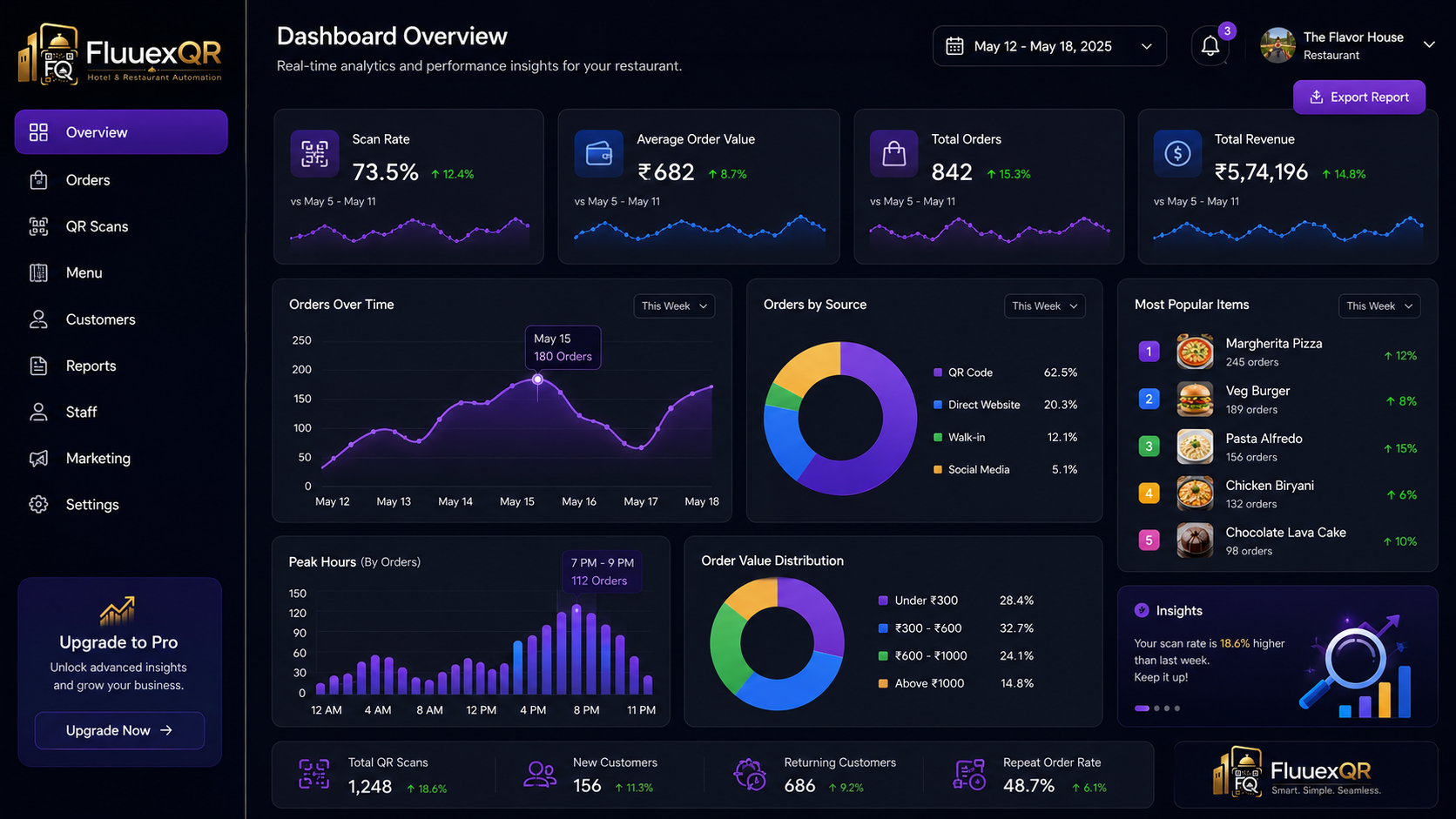
Analytics & Insights: Turning Menu Data into Money
The Metrics That Matter
| Metric | What It Tells You | Action |
|---|---|---|
| Scan Rate | % of seated guests who scan QR | If <70%, check placement/visibility |
| Browse-to-Order Rate | % of scanners who place an order | If <60%, menu may be confusing |
| Average Dwell Time | Time spent browsing before ordering | High = engaging; too high = confusing |
| Most Viewed Items | What's catching attention | Feature these prominently |
| Viewed but Not Ordered | "Ghost items" | Rename, reprice, or add photo |
| Modifier Attachment Rate | % of orders with upsells | If <20%, modifiers need better placement |
| Peak Ordering Times | When orders spike | Staff accordingly |
| Table Turnover Time | Time from seat to payment | Compare before/after QR implementation |
| Payment Method Split | UPI vs. card vs. cash | Optimize payment flow for dominant method |
| Repeat Scan Rate | Guests who scan on return visits | Loyalty opportunity |
Marketing Benefits: QR Ordering as Your Silent Salesperson
1. Menu as Marketing Asset
Your digital menu has a permanent URL. Share it on Instagram, Google Business, WhatsApp, and email newsletters. Guests can browse before they arrive, reducing decision time and increasing pre-visit excitement.
2. Social Proof Integration
Display "Most Popular" badges on items. Show review counts. Highlight chef's recommendations. Digital menus can incorporate social proof in ways paper menus cannot.
3. Promotional Flexibility
Run "Happy Hour" specials that auto-activate. Offer "First Order" discounts for new guests. Create "Combo Deals" that bundle high-margin items. All without reprinting a single menu.
4. Data-Driven Retargeting
Collect phone numbers or emails (with consent) at checkout. Send personalized offers: "We noticed you loved our Truffle Pasta. It's 20% off this week."
5. Review Generation
Auto-prompt guests for Google reviews 2 hours after payment. Satisfied guests are most likely to review immediately post-meal.
Upselling & Cross-Selling: The Psychology of Digital Recommendations
The Science of Digital Upselling
Research in behavioral economics shows that digital prompts are more effective than verbal suggestions because:
- No social pressure: Guests don't feel judged for adding extras
- Visual priming: Photos trigger desire more than words
- Default bias: Pre-checked options significantly increase attachment
- Anchoring: Showing premium options first makes mid-tier feel like a bargain
Effective Digital Upsell Techniques
| Technique | Example | Expected Lift |
|---|---|---|
| "Make It a Meal" | "Add fries and a drink for $4" | 25-40% attachment |
| Premium Protein Swap | "Upgrade to Wagyu beef (+$8)" | 15-25% attachment |
| Add-On Modifiers | "Add avocado (+$2)" — pre-checked | 40-60% attachment |
| Pairing Suggestions | "Pairs well with: Cabernet Sauvignon" | 20-30% attachment |
| "Complete Your Order" | "Don't forget dessert!" at checkout | 15-20% attachment |
| Limited-Time Offers | "Today's Special: Lobster Bisque" | 30-50% lift on featured item |
Table Turnover: How QR Ordering Cuts Dwell Time Without Rushing Guests
The Three Time Wasters
| Stage | Traditional Time | QR Ordering Time | Savings |
|---|---|---|---|
| Menu browsing | 5-8 minutes | 2-3 minutes | 3-5 minutes |
| Order placement | 3-5 minutes | 1-2 minutes | 2-3 minutes |
| Payment processing | 5-10 minutes | 1-2 minutes | 4-8 minutes |
| Total Time Saved | 9-16 minutes per table |
The Revenue Impact
For a 30-table restaurant open 6 hours for dinner:
- Traditional: 2 seatings per table = 60 covers
- With QR ordering: 2.5 seatings per table = 75 covers
- Additional 15 covers per night
- At $30 average check = $450 additional daily revenue = $164,250 annually
Operational Efficiency: The Compound Effect of Small Wins
QR ordering doesn't transform your restaurant through one big change. It creates efficiency through dozens of small optimizations that compound:
FluuexQR: The Digital Dining Platform Built for Modern Restaurants
Now that you understand the landscape, let's talk about FluuexQR — a QR ordering and digital dining platform designed specifically for the restaurant types and markets outlined in this guide.
What FluuexQR Does Differently
Most QR platforms treat restaurants as a feature list. FluuexQR treats restaurants as a business that needs to make more money while delivering better experiences.
Core Features
QR Menu & Scan-to-Order
- Dynamic QR codes that never need reprinting
- Mobile-optimized menus that load in under 2 seconds
- No app download required — works in any browser
- Multi-language auto-translation for tourist-heavy locations
Digital Menu Management
- Drag-and-drop menu builder
- Unlimited categories and items
- High-resolution image support
- Real-time availability toggling (instant 86'ing)
- Dietary tags: vegetarian, vegan, gluten-free, halal, kosher, nut-free
Self-Ordering & Table Ordering
- Guests browse, customize, and place orders from their table
- Table-specific QR codes ensure orders route correctly
- Special instructions field for guest notes
- Order confirmation with estimated prep time
Waiter Calling
- One-tap "Call Server" button for guests who need assistance
- Reduces guest anxiety about "abandoning" traditional service
- Maintains human connection while enabling digital efficiency
Kitchen Notifications
- Real-time order push to kitchen display screens
- Color-coded urgency indicators
- Course routing (appetizers → cold station, mains → hot station)
- Audio alerts for new orders
Payment Integration
- UPI (India)
- Credit/Debit cards (Stripe, PayPal)
- Digital wallets (Apple Pay, Google Pay)
- Cash payment option (with server notification)
- Split bill functionality
- Integrated tipping (pre-set percentages)
Menu Management
- Centralized dashboard for all menu changes
- Schedule menu updates (e.g., breakfast menu auto-switches to lunch at 11 AM)
- Seasonal menu templates
- Price change history and audit logs
Analytics Dashboard
- Scan rates by table and time
- Browse-to-order conversion
- Most viewed items
- Ghost item identification
- Average order value trends
- Peak hour analysis
- Payment method breakdown
Customer Insights
- Order history (anonymized)
- Popular modifier combinations
- Return visit tracking
- Feedback collection
Restaurant Branding
- Custom logo and brand colors
- Branded domain (yourrestaurant.fluuexqr.com)
- Custom QR code design
- Restaurant story/about section
Multi-Outlet Management
- Centralized menu control across all locations
- Location-specific pricing
- Brand consistency enforcement
- Consolidated reporting dashboard
Offers & Promotions
- Happy hour auto-scheduling
- Combo deal builder
- First-order discounts
- Loyalty point integration
- Promo code generation
Who FluuexQR Is Built For
Target Audience
- Independent Restaurants: One location, full control, maximum flexibility
- Cafés & Coffee Shops: Morning rush optimization, loyalty integration
- Fast Food Chains: Speed, consistency, multi-location management
- Fine Dining: Elegant digital menus that complement (not replace) service
- Cloud Kitchens: Essential infrastructure for delivery-only operations
- Bars & Pubs: Rotating tap lists, instant updates, tab management
- Hotels: Room service, multi-outlet dining, guest charging
- Multi-Location Chains: Centralized control with local flexibility
- Restaurant Investors: Scalable technology across portfolio companies
Markets Served
FluuexQR is built for global restaurant operations with local payment and compliance support:
- USA & Canada: Stripe, Square, Apple Pay, Google Pay
- UK: Card payments, digital wallets, VAT compliance
- Australia: Local payment methods, GST compliance
- India: UPI integration, GST invoicing, multi-language support
- UAE: Local payment gateways, Arabic language support
- Singapore: PayNow integration, multi-currency support
Expert Tips from Restaurant Technology Consultants
Tip 1: Start with the Menu, Not the Technology
The best QR implementation starts with menu engineering. Before you digitize, analyze your menu mix. Identify your stars (high margin, high popularity), puzzles (high margin, low popularity), plow horses (low margin, high popularity), and dogs (low margin, low popularity). Design your digital menu to feature stars and puzzles prominently.
Tip 2: Photography Is Non-Negotiable
A digital menu without photos is like a restaurant without lights. Invest in professional food photography or learn to shoot well-lit, styled photos with a modern smartphone. Each photo should answer the guest's question: "What will this look like on my plate?"
Tip 3: Train for Hospitality, Not Order-Taking
When you implement QR ordering, reframe your server's role. They are no longer order-takers. They are hospitality hosts, food guides, and experience curators. Train them to check in, not check on. "How is everything tasting?" beats "Are you ready to order?"
Tip 4: The First Two Weeks Set the Tone
Guest adoption of QR ordering follows a bell curve. Early adopters (week 1) will embrace it. The majority (weeks 2-4) will need gentle encouragement. Laggards (week 5+) will resist until they see others using it successfully. Staff enthusiasm is the single biggest predictor of guest adoption.
Tip 5: Monitor Ghost Items Relentlessly
Items that get viewed but not ordered are telling you something. Maybe the price is too high. Maybe the description is unclear. Maybe the photo is unappetizing. Maybe the placement is wrong. Fix one ghost item per week.
Tip 6: Use QR Codes for More Than Ordering
Place QR codes on:
- Takeout bags (link to review page)
- Receipts (link to loyalty program)
- Window displays (link to full menu for passersby)
- Social media (link to order-ahead)
Tip 7: A/B Test Everything
Digital menus allow testing that paper menus cannot:
- Test two item descriptions against each other
- Test photo vs. no photo for the same item
- Test price points (dynamic pricing makes this easy)
- Test modifier placement (above vs. below item)
Real Restaurant Scenarios: Before and After QR Ordering
Scenario 1: The Busy Café Morning Rush
| Metric | Before QR Ordering | After QR Ordering |
|---|---|---|
| Queue length | 15 people at counter | 5 people at counter |
| Serve time | 4 minutes per customer | 2 minutes per customer |
| Queue duration | 60 minutes | 10 minutes |
| Customer loss | Customers leave when line exceeds 8 | 30% fewer customers leave |
Scenario 2: The Fine Dining Wine List
| Metric | Before QR Ordering | After QR Ordering |
|---|---|---|
| Menu format | 80-item printed wine list on cardstock | Digital wine list with search & filter |
| Update process | Reprinted quarterly at $400/run | Updated instantly when shipments arrive |
| Sommelier time | 5 minutes per table explaining | Guests browse independently |
| Average wine order | $45 | $62 |
Scenario 3: The Multi-Location Chain
| Metric | Before QR Ordering | After QR Ordering |
|---|---|---|
| Menu management | 12 locations, each with own version | One dashboard, 12 locations |
| Price changes | 12 separate updates required | Push to all locations in 30 seconds |
| Brand consistency | Inconsistent across locations | Enforced automatically |
| Performance visibility | No visibility | Real-time analytics per location |
Scenario 4: The Tourist-Heavy Restaurant
| Metric | Before QR Ordering | After QR Ordering |
|---|---|---|
| Menu language | English only | Auto-translates to 12 languages |
| Staff time | 30% spent explaining dishes | Focused on service |
| Specialty orders | Tourists order safe items (burger, pizza) | Specialty dish orders up 28% |
| Average check | $18 | $24 |
Common Mistakes That Kill QR Ordering Implementations
Mistake 1: Choosing a PDF Menu
PDFs are not digital menus. They are scanned paper on a screen. They don't resize. They don't search. They don't integrate. They load slowly. They frustrate guests.
Never Use a PDF as Your QR Menu
Mistake 2: Forcing App Downloads
Every barrier between "guest sits down" and "guest orders" reduces conversion. App downloads are a massive barrier. App download rates for restaurant apps hover around 5-15%, while QR scan rates reach 70-90%.
Mistake 3: No Staff Training
If your staff doesn't understand the new workflow, they won't guide guests. If they feel threatened by technology, they'll subtly discourage its use. Train thoroughly. Address concerns. Frame QR ordering as a tool that makes their job easier, not a replacement.
Mistake 4: Ignoring the Backup Plan
WiFi goes down. Phones die. QR codes get damaged. Always have a backup: printed menus, staff-assisted ordering, or a tablet at the host stand.
Mistake 5: Set-It-and-Forget-It
A digital menu is not a "set up once" project. It requires ongoing optimization: updating photos, testing descriptions, adjusting prices, analyzing analytics. Treat it like a living document.
Mistake 6: Poor QR Code Placement
QR codes flat on the table require guests to lean over awkwardly. QR codes in dim lighting don't scan. QR codes behind condiment bottles get ignored. Place them at eye level, well-lit, and unobstructed.
Mistake 7: Neglecting Accessibility
Small fonts, low contrast, and missing alt-text exclude guests with visual impairments. Ensure your digital menu meets WCAG 2.1 accessibility standards.
Buying Guide: How to Choose the Right QR Ordering Platform
The Evaluation Checklist
Use this checklist when evaluating QR ordering platforms:
Core Functionality
- Interactive HTML menu (not PDF)
- Mobile-responsive design
- No app download required
- Real-time menu updates
- Table-specific QR codes
- Order placement through QR menu
- Payment integration
Menu Features
- Unlimited items and categories
- High-quality image support
- Modifier and customization options
- Dietary tags and allergen information
- Multi-language support
- Search functionality
- Menu scheduling (breakfast/lunch/dinner auto-switch)
Operational Integration
- POS integration (or built-in POS)
- Kitchen Display System (KDS) support
- Real-time inventory sync
- Staff role management
- Audit logs
Payment & Billing
- Local payment methods (UPI, cards, wallets)
- Split bill functionality
- Integrated tipping
- Tax and service charge configuration
- Cash payment option
Analytics & Marketing
- Scan rate tracking
- Order conversion analytics
- Item performance reports
- Customer insights
- Promo code system
- Review generation
Scalability & Support
- Multi-location management
- White-label/branded domain
- API access
- 24/7 support
- Training resources
- Data export capability
Pricing Red Flags
Avoid These
🚩 Per-order commissions: These eat into margins unpredictably
🚩 Mandatory hardware purchases: You should be able to use your existing devices
🚩 Long-term contracts: Month-to-month options show confidence
🚩 Hidden setup fees: Transparent pricing builds trust
🚩 No free trial: You should test before you buy
Myths vs. Facts: Debunking QR Ordering Misconceptions
"QR menus are just a pandemic fad"
QR ordering has evolved from basic PDFs to integrated ordering platforms. Adoption is accelerating, not declining. In Europe, average adoption is 58% and climbing.
"QR ordering replaces waiters"
QR ordering replaces order-taking, not waiters. Servers shift to hospitality, increasing tips and job satisfaction.
"Older guests won't use QR codes"
Data shows 60%+ of guests over 60 successfully use QR menus when assisted. The key is offering paper as an alternative, not abandoning QR.
"QR menus are only for cheap restaurants"
Fine dining restaurants use QR for wine lists, tasting menus, and allergen information. The Ritz-Carlton uses digital menus.
"QR ordering is expensive"
At $50/month, a QR platform costs less than quarterly menu reprints for most restaurants. The ROI is typically achieved in the first month.
"Guests prefer paper menus"
Guests prefer what works. A well-designed digital menu with photos and descriptions outperforms a plain paper menu. Guests resist poorly designed QR menus, not QR itself.
"QR codes are insecure"
Modern QR platforms use SSL encryption, PCI-compliant payment processing, and tokenized data. They are as secure as any e-commerce website.
"You need technical expertise to set up QR ordering"
Modern platforms offer drag-and-drop builders. Most restaurants go live in under 48 hours with no technical staff.
FAQs: Every Question a Restaurant Owner Asks About QR Ordering
Conclusion: The Future of Dining Is Already Here
The restaurant industry has always been about two things: great food and great hospitality. QR ordering doesn't change that. It removes the friction that gets in the way of both.
When a guest doesn't have to flag down a server to place an order, they get their food faster. When a server doesn't have to spend half their shift taking orders and running payments, they can focus on making every guest feel welcome. When a kitchen receives orders digitally instead of through handwritten tickets, mistakes disappear and consistency improves.
The restaurants thriving in 2026 are not the ones that resisted technology. They're the ones that embraced it thoughtfully — using QR ordering as a tool to enhance human connection, not replace it.
The QR code on your table is not a cost-cutting measure. It's a revenue-multiplying, experience-enhancing, data-generating infrastructure layer that turns every guest interaction into an opportunity.
The question is no longer whether QR ordering belongs in your restaurant. The question is: how sophisticated will your digital dining experience be?
Ready to Transform Your Restaurant?
FluuexQR is the digital dining platform built for restaurants that refuse to settle for basic QR codes. With integrated ordering, multi-language support, real-time kitchen notifications, and analytics that actually drive decisions, FluuexQR turns every table into a revenue engine.